Koinly vs CoinTracker vs CoinLedger as Portfolio Trackers
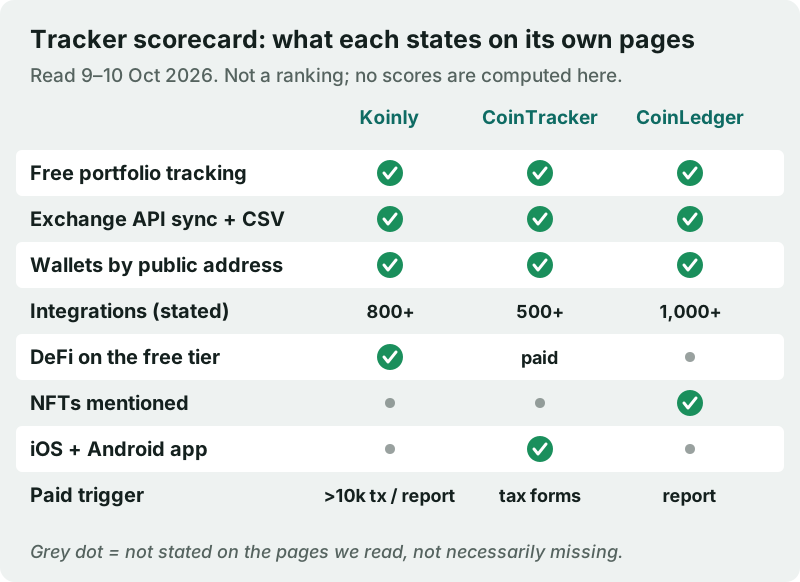
As everyday portfolio trackers, Koinly, CoinTracker and CoinLedger are closer than their tax-software reputations suggest: all three let you track a portfolio for $0 and charge only when you want tax output. Koinly is the most complete free tracker of the three, since every feature including DeFi is free until you buy a report or pass 10,000 transactions. CoinTracker has the clearest mobile-app story and generous free wallet limits, but says DeFi positions need a paid plan. CoinLedger states the most integrations, and its report prices match Koinly's at the 100- and 1,000-transaction levels.
Pick Koinly if you want DeFi in a free tracker, CoinTracker if you live on your phone and mostly use exchanges, and CoinLedger if you want unlimited free syncs now and a one-time US tax report later. Skip all three if you only need a balance and hold everything in one wallet; your wallet's own view is enough. Prices and plan details below were read on the vendors' pages on 9 and 10 Oct 2026.
Short verdict
| Koinly | CoinTracker | CoinLedger | |
|---|---|---|---|
| Free tracking | Yes; all features free until a report | Yes; unlimited wallets, up to 50k tx per wallet | Yes; unlimited wallet and exchange syncs |
| When you pay | For a tax report, or above 10,000 tx | For tax forms and some features | For a tax report |
| Paid prices | $49 / $99 / $199+ per tax year | $59–$1,999 a year by tx count | $49 / $99 / $199+ one-time |
| Integrations stated | 800+ exchanges and wallets | 500+ | 1,000+ |
| DeFi | Free; staking, lending, LPs named | Paid plan for DeFi positions | Blockchain and DeFi imports listed |
| Mobile app | Not stated on pages read | iOS and Android, all plans | Not stated on pages read |
Free tiers and caps (dated)
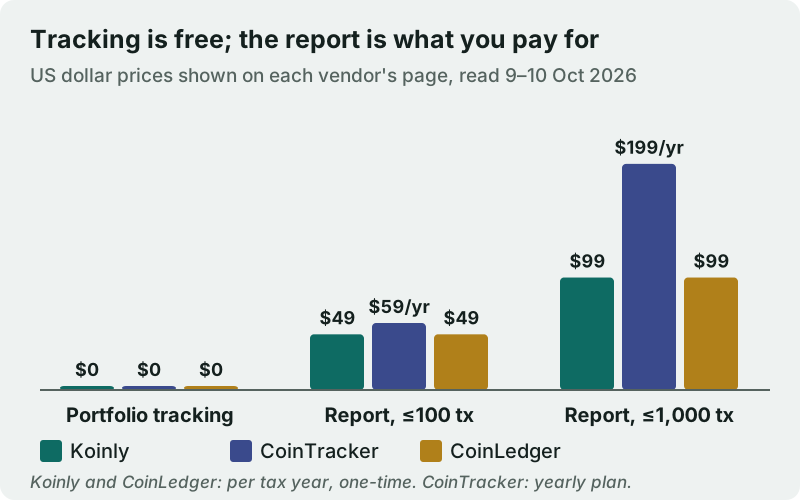
Koinly's pricing page says every feature is free: connecting wallets, importing history and previewing a tax summary. You pay only for the tax report itself, and if you have more than 10,000 transactions, in which case it moves you to its Pro plan with 1,000-transaction top-ups. Plans are one-time payments per tax year, not subscriptions, with a 7-day refund if no report was generated. Read on 10 Oct 2026, its plans were Newbie at $49 per tax year (up to 100 transactions), Hodler at $99 (up to 1,000) and Trader from $199 (3,000 or more).
CoinTracker's Free plan lets you connect as many wallets and exchanges as you like, with up to 50,000 transactions per wallet. Its FAQ says Free covers portfolio tracking, automatic categorisation, cost basis across transfers and a tax-summary preview, while tax forms, TurboTax and H&R Block integrations, tax-loss harvesting and DeFi positions need a paid plan. The same page's comparison table marks portfolio tracking as not included on Free, so the page contradicts itself; test the free plan before you rely on it. Paid plans run from Base at $59 a year (100 transactions) through Prime at $199 (1,000) and Ultra at $599 (10,000) to Ultra+ at $1,999 (50,000).
CoinLedger is the simplest: tracking is $0 with unlimited wallet and exchange syncs, and you buy a report only when you need one, at $49 for up to 100 transactions, $99 for up to 1,000 and $199 and up for 3,000 or more. Each report is a one-time purchase for one tax year, available for any year from 2010 to 2025.
One quirk for Coinbase users: Coinbase's own Coinbase One page listed a partner offer on 10 Oct 2026 of a free CoinTracker Base plan, or $59 off another plan, for members. If you already pay for Coinbase One, check it before buying a CoinTracker plan.
Sync and integrations
All three connect exchanges by API key or CSV upload and read self-custody wallets from public blockchain data, which is how a tracker should work. Their stated integration counts differ: Koinly's homepage FAQ says 800+ exchanges and wallets (its integrations page says 1,000+), CoinTracker says 500+, and CoinLedger says 1,000+. Counts measure breadth, not quality; what matters is whether your particular exchanges and chains sync cleanly.
Transfers are the hard part of syncing. When you withdraw coins from an exchange into a wallet you control, a tracker must recognise both sides as one transfer rather than a sale and a new purchase, or your holdings and cost basis go wrong. Koinly says transfers between your wallets are tracked automatically and keep their original cost basis; CoinTracker says it rebuilds cost basis across transfers your exchange cannot see, and includes that on Free. For the trade-offs between automatic and manual syncing, see manual vs auto-sync tracking.
DeFi and NFT coverage
This is where the three separate most clearly. Koinly names staking on Solana, lending on Curve and providing liquidity on Uniswap as activity it handles, and, because all features are free until you buy a report, that DeFi decoding is part of the free tracker. CoinTracker's FAQ puts DeFi positions behind a paid plan, even though it lists DeFi support across its plan table. CoinLedger lists blockchain and DeFi protocol imports and full support for NFT assets, without saying which tier each belongs to.
In practice, a tax-first tracker handles DeFi as transactions to be categorised rather than as live positions to be valued, which is different from what a dashboard like Zerion or DeBank shows. If you mainly want to see LP and lending positions in real time, read how to track DeFi and NFTs before choosing between these three.
Apps and alerts
CoinTracker's plan table lists a mobile app for Android and iOS on every plan, including Free, plus daily portfolio updates; performance tracking starts on Prime. Koinly describes a dashboard of holdings, ROI and growth over time, and CoinLedger lists portfolio tracking on all plans, but neither mobile apps nor price alerts were stated on the pages we read. If push alerts and a phone-first experience are the point, a dedicated tracker such as CoinStats may suit you better than any of these three.
Privacy and API permissions
Each of these is a cloud service, which means it holds a complete and continuously updated record of what you own and every trade you made. That is the price of automatic sync and tax output. The protection that matters is the permission on each exchange key: read-only access lets the tracker see balances and history but never trade or withdraw, so a breach exposes data, not funds. Create one key per tracker, as described in read-only API keys explained, and revoke it when you stop using the app.
Watch the onboarding flow too. Some exchanges offer a one-click connection instead of a pasted key; check which permissions that connection grants before approving it. And because a tracker's data is only as private as the company holding it, our piece on privacy of crypto portfolio apps is worth reading before you connect everything.
Test any of the three in fifteen minutes
Because all three track for free, you can check accuracy before committing, and you should, since a tracker's numbers are only as good as its sync. Use one exchange and one wallet whose history you know well.
- Connect the exchange with a fresh read-only API key and add the wallet by its public address.
- Compare each balance with what the exchange and a block explorer show today. Small gaps are usually pricing; large gaps are missing transactions.
- Find one transfer between the two and confirm it appears as a single transfer, not as a sale plus a new purchase.
- Look for dust and spam tokens. CoinTracker says spam and dust are never counted against its limits; check that airdropped junk is hidden or ignored in all three.
- If you use DeFi, open one position and compare its value with the protocol's own dashboard.
Whichever tracker gets those five checks right on your own data is the right one for you, whatever the comparison tables say. Delete the keys from the ones you reject.
Edge cases
- Very active wallets: CoinTracker's free plan stops at 50,000 transactions per wallet, and Koinly charges once you pass 10,000 transactions; bots and frequent DeFi users can hit either.
- Outside the US: Koinly says it is available in 20+ countries; the CoinTracker and CoinLedger prices above are in US dollars and both pages lead with US filing tools such as TurboTax. European users may prefer a tool with local tax guides for their country, such as Blockpit.
- Past years: CoinLedger sells reports for any year from 2010 to 2025, and CoinTracker's paid plans include every past year's forms; useful if you never filed crypto before.
- Plan limits mid-year: CoinTracker lets you move up a plan during the year and pay only the difference, with downgrades at renewal.
Which to choose
Choose Koinly if you want DeFi in a free tracker
Koinly gives the fullest free tracker of the three, with DeFi decoding included and no charge until you buy a report for a tax year or exceed 10,000 transactions. It suits on-chain users in any of the 20+ countries it says it supports. Its report prices, $49 for up to 100 transactions and $99 for up to 1,000 per tax year when read on 10 Oct 2026, match CoinLedger's.
Choose CoinTracker if you track mostly on your phone
CoinTracker's free plan covers unlimited wallets and a mobile app on iOS and Android, with cost basis rebuilt across transfers. It is the weakest free option for DeFi, and its paid plans are yearly subscriptions rather than one-off reports. You will find it at cointracker.io.
Choose CoinLedger if you'll buy a US tax report anyway
CoinLedger's free tracker has unlimited syncs and the most stated integrations, and its one-time reports undercut CoinTracker's yearly plans at both the 100- and 1,000-transaction levels. It suits US users who want tracking now and a cheap report later.
Where tracking ends and tax filing begins
Tracking and filing overlap but are not the same job. Per the IRS, a US broker's Form 1099-DA covers your gross proceeds starting with transactions from 1 January 2025, and cost basis gets added for certain transactions from 1 January 2026. Those forms often lack basis for coins moved in from elsewhere, which is exactly the gap a tracker with your full history fills. This site covers that from the tracking side in tracking cost basis for taxes; for filing itself, use dedicated tax software or a professional.
Koinly, CoinTracker and CoinLedger: FAQ
Is Koinly better than CoinTracker?
How much does CoinTracker cost?
Is CoinTracker free to use as a portfolio tracker?
What is CoinTracker, and who owns its data?
Which is cheapest for a crypto tax report?
Ready to pick a tracker? See the best crypto portfolio trackers, compared, or read how to track your portfolio safely with read-only keys.