MetaMask Portfolio in 2026: Status, Changes and Alternatives
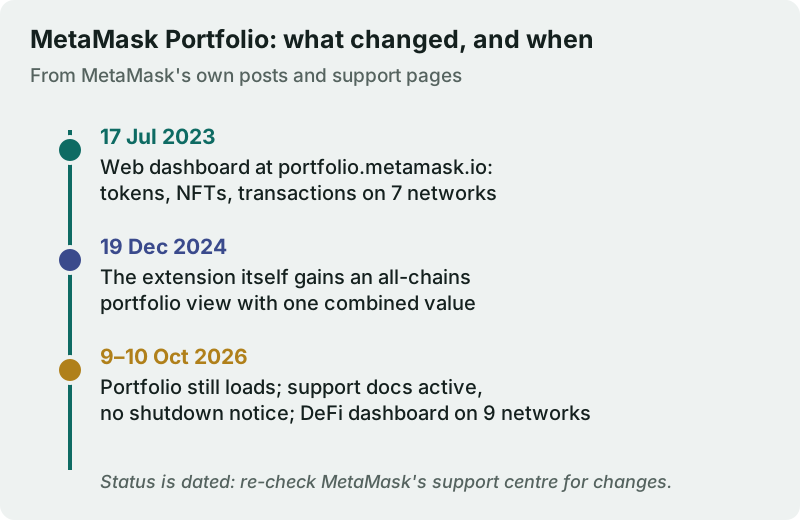
MetaMask Portfolio has not been shut down. On 9 and 10 Oct 2026 the web app still loaded under the name "MetaMask Portfolio" at both portfolio.metamask.io and app.metamask.io, and MetaMask's support centre still ran an active Portfolio section with no deprecation or sunset notice. What has changed is where you see your balances: since 19 December 2024 the MetaMask extension shows its own all-chains portfolio view on the home screen, so many people never need the separate dashboard.
If you want more than MetaMask shows, the real alternatives are watch-only trackers such as Zerion and rotki, all-in-one apps such as CoinStats, or trackers that can turn into tax reports, like Koinly and CoinLedger. Stay with MetaMask Portfolio if your crypto lives on EVM networks and in one wallet family. Look elsewhere if you hold Bitcoin or Solana, use several exchanges, or want profit-and-loss history.
Short answer: MetaMask Portfolio status as of October 2026
The searches for "MetaMask Portfolio" and "MetaMask Portfolio dashboard" usually come from one of two places: someone who used the old web dashboard and cannot find it, or someone who has seen balances appear inside the extension and wonders whether Portfolio still exists. Both have the same answer. The web dashboard is still live, and the extension now does part of its job.
Absence of a shutdown notice is not a promise that none is coming, so treat this as a dated status, not a guarantee. MetaMask has renamed and reorganised its web tools before, and the safest habit is to reach Portfolio from a link on metamask.io rather than from a search ad or a bookmark of unknown origin.
What MetaMask Portfolio did, and still does
MetaMask introduced the web dashboard on 17 July 2023, under the MetaMask Web name, as a single window for tokens, NFTs and transactions across multiple accounts. At launch it aggregated seven networks: Ethereum, Optimism, Arbitrum, BNB Chain, Polygon, Avalanche and Fantom. It filtered out spam NFTs and unverified transactions by default, let you paste any public address to view it, and offered a download of your transaction history. Buy, Swap, Bridge and Stake sat alongside it in the same web app.
Today's support pages describe a broader tool. You can watch any Ethereum account by ENS name or public address without connecting it, and MetaMask is explicit that watching an account does not mean you own it. A DeFi dashboard reads positions on nine networks (Ethereum, Optimism, BNB Chain, Polygon, Fantom, Base, Linea, Arbitrum and Sei), with protocol coverage drawn from an open-source library; if a position is missing, the usual reason is that its protocol has not been added. Portfolio can also show balances from two centralised exchanges, Binance and Coinbase, by signing in through a third-party service called Mesh; to transact, you must move assets to a MetaMask account.
What replaced it inside MetaMask
The change most users noticed came on 19 December 2024, when MetaMask added a portfolio view to the extension: all tokens across all chains, with a combined value, on the home screen. For a single wallet that covers the everyday question of "what am I worth right now" without opening another site. The separate web app still adds what the extension does not: watched accounts you do not own, the DeFi dashboard, exchange balances and the transaction export.
Neither view reaches beyond MetaMask's world. Bitcoin held in a hardware wallet, coins on an exchange other than Binance or Coinbase, and positions on chains outside the supported list will not appear. That gap, rather than any shutdown, is why most people go looking for alternatives.
Alternatives for tracking MetaMask wallets
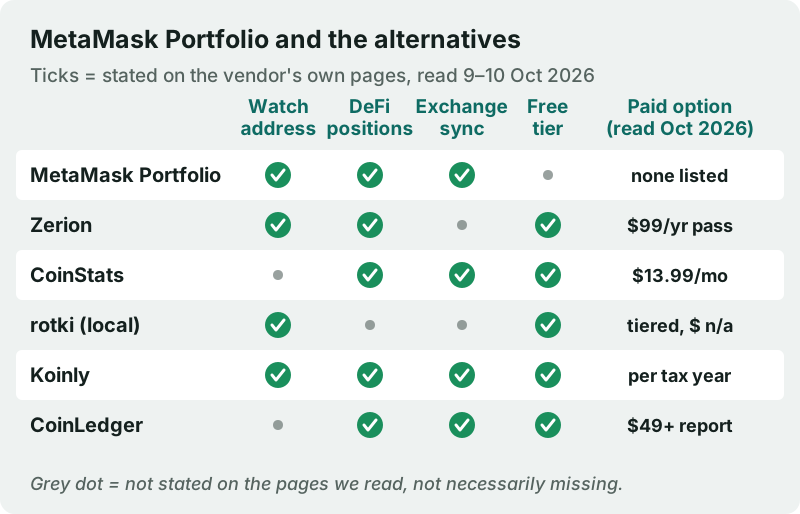
All of these trackers are built to follow on-chain wallets without your keys, which is the property that matters most; the ones ticked under "watch address" say on their own pages that a public address is enough. They differ in chain coverage, how well they decode DeFi positions, whether they sync exchanges, and what they charge. The matrix records only what each vendor states on its own pages, read on 9–10 Oct 2026; a grey dot means we did not see the feature stated, not that it is missing.
Zerion: the closest like-for-like swap
Zerion's wallet tracker is free, needs no sign-up and lets you watch unlimited addresses. It says it covers 66 chains, including Solana and Tron, and more than 4,500 DeFi protocols, discovering tokens, NFTs and DeFi positions, deposits and rewards included, automatically. Bitcoin is not on its tracked list. Zerion Premium is a $99 annual pass with no automatic renewal that adds realised and unrealised profit and loss per token.
CoinStats: one app for wallets and exchanges
CoinStats suits someone whose MetaMask wallet is one piece of a larger picture that includes exchange accounts. Its free Basic plan allows 10 portfolios and 20,000 transactions; Premium costs $13.99 a month after a trial and raises those limits to 100 portfolios. Its DeFi page advertises DeFi and NFT tracking, with in-depth profit-and-loss analysis listed under Premium. It is a cloud service, so it holds a live map of everything you connect.
rotki: the private, local option
rotki runs on your own computer, so your account exists only on your machine and its files are encrypted locally. It reads EVM chains, Bitcoin and Bitcoin Cash (including by xpub), Polkadot, Kusama and Solana. The free version keeps the 1,000 most recent events; paid Supporter, Basic and Advanced plans raise that to 3,000, 30,000 and 100,000 events. It asks for more setup than a web app.
Koinly
Koinly is free for tracking and for previewing your gains: you connect wallets by public address and exchanges by API or CSV, and it says it handles DeFi activity such as staking, lending and liquidity provision. You pay only for a tax report, per tax year, from $49 for up to 100 transactions (read 10 Oct 2026). Its homepage lists more than 800 exchanges and wallets. Choose it if your MetaMask history will one day need a cost-basis record.
CoinLedger
CoinLedger also tracks for free, with unlimited wallet and exchange syncs and more than 1,000 integrations, and imports transactions from blockchains and DeFi protocols. Tax reports are one-time purchases: $49 for up to 100 transactions, $99 for up to 1,000 and $199 and up beyond that, as listed on 9 Oct 2026.
Blockpit, for EU and UK users
Blockpit publishes local pages and tax guides for the UK and most EU countries, and sells a PLUS plan at €3.99 a month, billed annually, for daily data sync and full portfolio charts. Its tax reports are priced per tax year by transaction count, from €49 for up to 50 transactions, as listed on 10 Oct 2026. It fits a European MetaMask user who wants tracking and a tax report in one place.
For the full field, see our best crypto portfolio tracker comparison.
Which alternative fits which MetaMask user
- One MetaMask wallet on EVM chains, no exchanges: the extension's own portfolio view, plus Portfolio's DeFi dashboard when you need position detail. Nothing to install, nothing to pay.
- Several wallets across EVM chains and Solana: Zerion, because it watches unlimited addresses for free and decodes DeFi positions; its $99 pass only matters if you want profit and loss.
- MetaMask plus a Bitcoin hardware wallet: rotki, which reads a Bitcoin xpub locally, or a tax-capable tracker. Remember that an xpub reveals every past and future address of that wallet to whoever holds it.
- MetaMask plus exchange accounts: CoinStats for a phone-first view, or Koinly or CoinLedger if the same data will later feed a tax report.
- Privacy first: rotki, since nothing leaves your machine except the public-data lookups it makes.
Whichever you choose, test it on one wallet you know well before trusting its totals, and compare anything large against the protocol or exchange it sits on. Our guide on how to track your crypto portfolio walks through that setup.
Read-only tracking without connecting your wallet
Wherever a tracker accepts a public address on its own, use that method. Copy your address from MetaMask, add it to the tracker as a watched account, and nothing is signed: the app reads public blockchain data and cannot move a token. "Connecting" a wallet through a browser pop-up is different, because it opens a channel through which the site can later ask you to sign messages or approve transactions. For a pure tracking job you never need that channel.
Exchange balances are the exception, since they are not on-chain. Use a read-only API key where the tracker supports one, as explained in read-only API keys, and note that MetaMask's own exchange view goes through Mesh, a third party. A watch address keeps theft risk at zero, but it is not private: anyone with the address can see its holdings, and a tracker that links several addresses learns how they fit together. Our guide to the privacy of portfolio apps covers that trade-off.
Edge cases and red flags
- A site that asks for your Secret Recovery Phrase to "restore" Portfolio is a drain attempt. MetaMask Portfolio reads accounts by address; it never needs the phrase.
- Hardware-wallet accounts can be tracked the same way: watch the public address and leave the device unplugged.
- Positions missing from the DeFi dashboard usually mean the protocol is not in MetaMask's open-source library yet; check the protocol's own app before assuming funds are gone.
- Different totals in two trackers are normal. Each prices tokens and decodes positions differently, so compare large holdings against the source.
- Search ads for "MetaMask Portfolio" can lead to look-alike sites. Start from metamask.io instead.
For a wider look at warning signs, see our tracker red flags checklist.
MetaMask Portfolio: FAQ
Is MetaMask Portfolio shutting down?
Where is the MetaMask Portfolio dashboard now?
Can MetaMask Portfolio track a wallet I don't own?
Does MetaMask Portfolio show DeFi positions?
What is the best alternative to MetaMask Portfolio?
Ready to pick a tracker? See the best crypto portfolio trackers, compared, or read how to track your portfolio safely with read-only keys.