Bitcoin Wallet Tracker: How to Track a BTC Wallet With an xpub
To track a Bitcoin wallet properly, give a tracker the wallet's extended public key, called an xpub, ypub or zpub depending on the address type, rather than a single address. A Bitcoin wallet spreads its coins across many addresses, including change addresses you never see, so one address in a block explorer usually shows only part of your balance. An xpub lets a tracker find every address the wallet has used or will use, and it cannot spend a single satoshi.
The catch is privacy, not theft. The Bitcoin standard that defines xpubs, BIP 32, says that leaking a public key can mean loss of privacy, and an xpub exposes your whole transaction history and every future address to whoever holds it. So the safest Bitcoin wallet tracker is one that keeps the xpub on your own machine, such as a watch-only wallet in Sparrow or the local-first app rotki. Cloud trackers like Koinly accept xpubs too, which is convenient but hands that map to a company. Tool details below were read on 18 October 2026 unless dated otherwise.
Why tracking one Bitcoin address is not enough
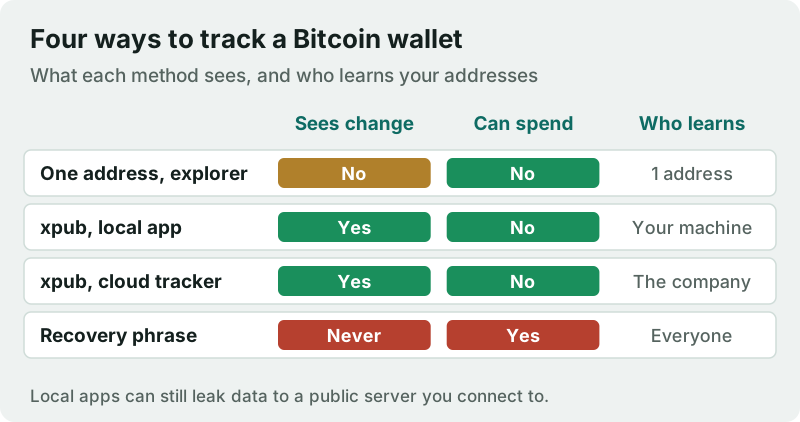
Bitcoin wallets are built to use fresh addresses. Each time you ask to receive, the wallet hands out a new address, and each time you spend, it usually sends the leftover amount to another new address it controls, called a change address. Koinly's own help guide puts it plainly: for any blockchain that generates a new address every time you receive, using the UTXO model, you need the xpub to import all transactions automatically.
That is why pasting a single address into a block explorer works for a one-off check, such as confirming a payment arrived, but fails as a portfolio view. After your first spend, part of the balance sits at a change address the explorer is not watching. It is also why a tracker that asks for one Bitcoin address often shows a smaller balance than your wallet does. The fix is not more addresses typed by hand; it is the key that generates them.
xpub, ypub and zpub, explained
An extended public key is the public half of the key tree defined in BIP 32. From it, software can derive every non-hardened public key below it, and so every receive and change address, without any private key. BIP 32 itself describes the intended use: an auditor given the account's extended public keys can see all incoming and outgoing payments, but not a single secret key. A portfolio tracker is exactly that auditor.
The three prefixes describe the same thing for different address types. Sparrow Wallet's documentation notes that some script types have aliases for the xpub, ypub and zpub among them, that identify the address type, and that these are synonymous. In practice, older addresses starting with 1 pair with an xpub, addresses starting with 3 with a ypub, and native SegWit addresses starting with bc1q with a zpub. Your tracker needs the one that matches, or it will look in the wrong place.
The privacy cost of sharing your xpub
BIP 32 is direct about the risk: private keys must be kept safe because leaking one means access to coins, while leaking a public key can mean loss of privacy. For an xpub that loss is total within the wallet. Anyone holding it can list every payment you received, every amount you sent, the change you kept and the addresses you will use next, indefinitely. They cannot take the coins, but they can learn your balance and link your spending, which is what scammers, data brokers and thieves would like to know.
The standard also warns that extended public keys must be treated more carefully than regular public keys, because an xpub combined with any single non-hardened private key below it reveals the parent private key. That is a narrow attack, but it is one more reason to share an xpub only where you would share your bank statement. Our wider guide on the privacy of crypto portfolio apps covers what cloud trackers collect beyond the key.
Bitcoin wallet trackers that read an xpub (dated)
| Tool | How it tracks Bitcoin | Where your xpub lives | Cost noted |
|---|---|---|---|
| Sparrow Wallet | Watch-only wallet from an xpub | Your computer; a public server sees your public key data | Not checked |
| rotki | xpub, ypub or zpub finds all addresses | Your computer (local-first) | Free tier limited to 1,000 events |
| Koinly | xpub, ypub, zpub or Bech32 address | Koinly's servers | Tracking free; pay for the tax report |
| Zerion | Bitcoin not listed among its 66 tracked chains | n/a for Bitcoin | Free, no signup |
| Block explorer | One address at a time | The explorer sees what you look up | Free |
Sparrow is the most private route for a desktop user. Its quick-start guide shows an xpub or watch-only wallet as a standard wallet type that can see your transactions but not spend them, and it warns that connecting to a public server shares your public key information with whoever runs that server, which it does not recommend for significant funds. Running your own server removes that leak; using a public one is a reasonable start for small balances.
rotki keeps everything on your machine, encrypted, and accepts xpub, ypub and zpub keys for Bitcoin, which suits anyone who also tracks EVM wallets in one place. Koinly is the convenient cloud option: it supports Bech32 addresses and xpub, ypub and zpub keys for Bitcoin and several other UTXO coins, tracking is free, and you pay only for a tax report. If you also need tax reports, you can try Koinly's free tracking. Zerion, popular for EVM wallets, does not list Bitcoin among its tracked chains.
How to track a Bitcoin wallet with an xpub, step by step
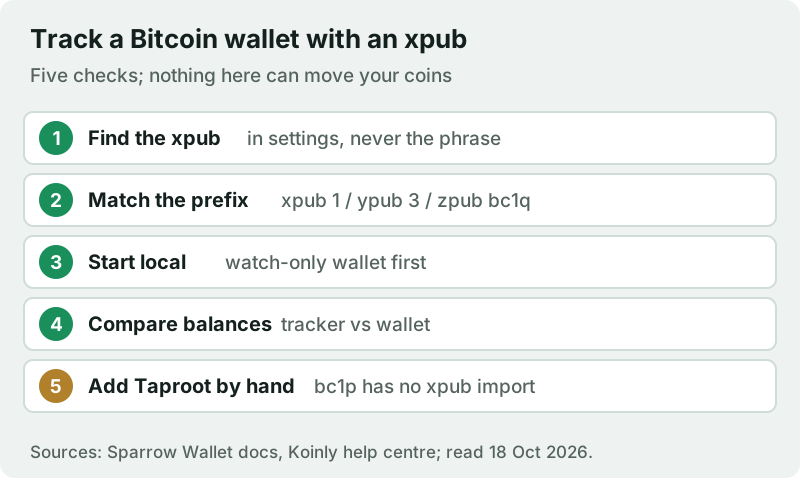
Two warnings belong with those steps. First, some guides, including Koinly's own, describe deriving an xpub by typing your recovery phrase into a key-generation tool when a wallet will not show it; Koinly itself flags that this may expose your seed phrase and should be avoided. Do not do it on any online computer. Second, Koinly says it is not currently possible to generate an xpub for Taproot addresses, those starting with bc1p, so you must import those by CSV or add each address by hand.
If you track exchanges as well as wallets, connect them with read-only API keys rather than any key that can trade or withdraw. Our crypto portfolio tracker ranking compares the all-in-one options, and the guide to tracking your crypto portfolio covers every connection method.
Edge cases
- You want to track someone else's wallet. You can watch any public address in an explorer, but an address does not name its owner, and you will see only what that address did.
- Your hardware wallet shows only a generic xpub. Koinly notes Ledger Live displays the generic xpub whatever the address type, so you may need the matching ypub or zpub for SegWit addresses.
- Balances disagree after a spend. The tracker is probably missing change addresses; check that the key type matches your addresses and that the gap limit covers them.
- You use several accounts in one wallet. Each account has its own xpub; add each one, or the tracker will show only the first.
Bitcoin wallet tracking: common questions
How do I track a Bitcoin wallet?
Is it safe to share my xpub?
What is the difference between xpub, ypub and zpub?
Can I track a Bitcoin wallet without an xpub?
Can you find out who owns a Bitcoin wallet?
Ready to pick a tracker? See the best crypto portfolio trackers, compared, or read how to track your portfolio safely with read-only keys.